 SongCatcher
Listening3:41:0814 caught
Leave it listening. Get the whole night back.
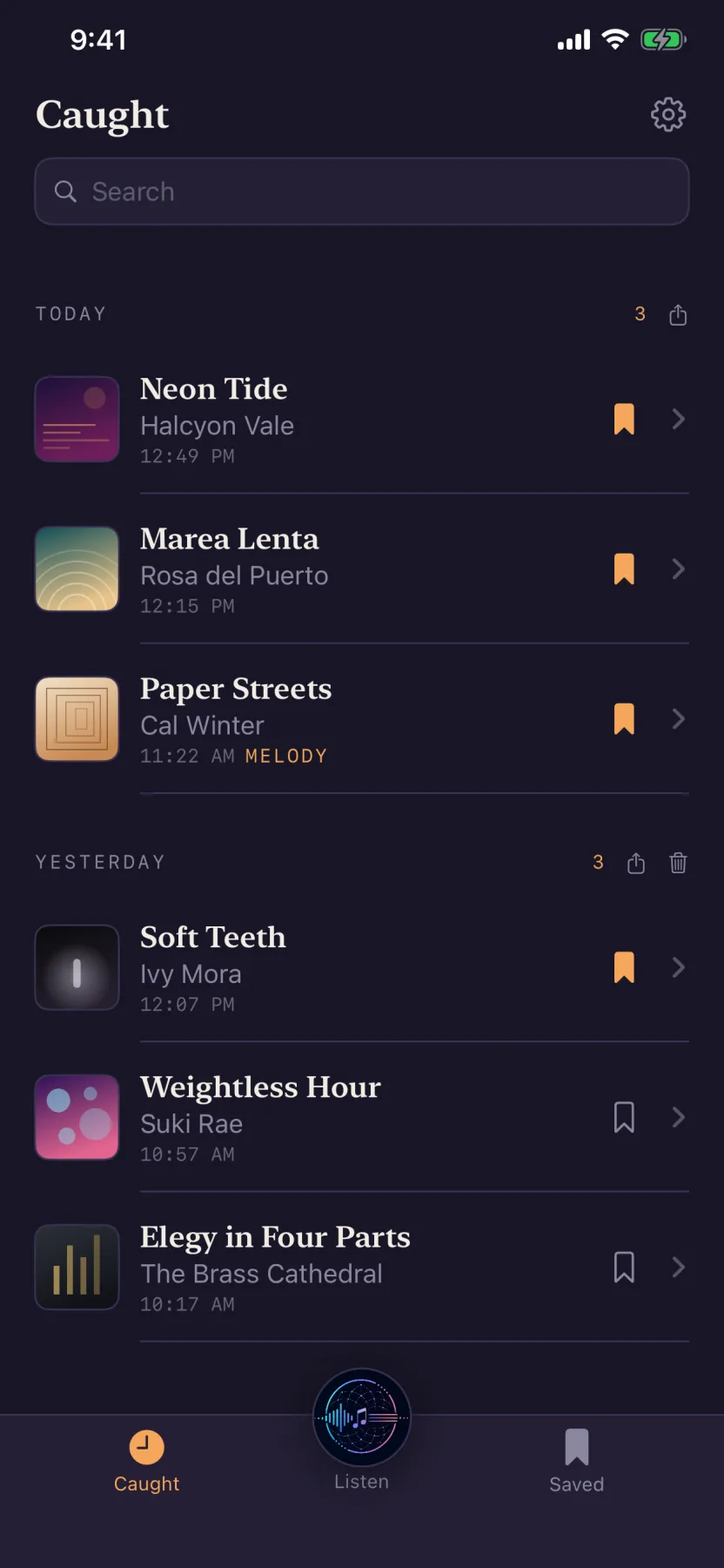
You only ever Shazam the songs you remember to Shazam. This one runs for hours and catches every track that plays around you — each one named, timestamped, and filed under the bar you heard it in.
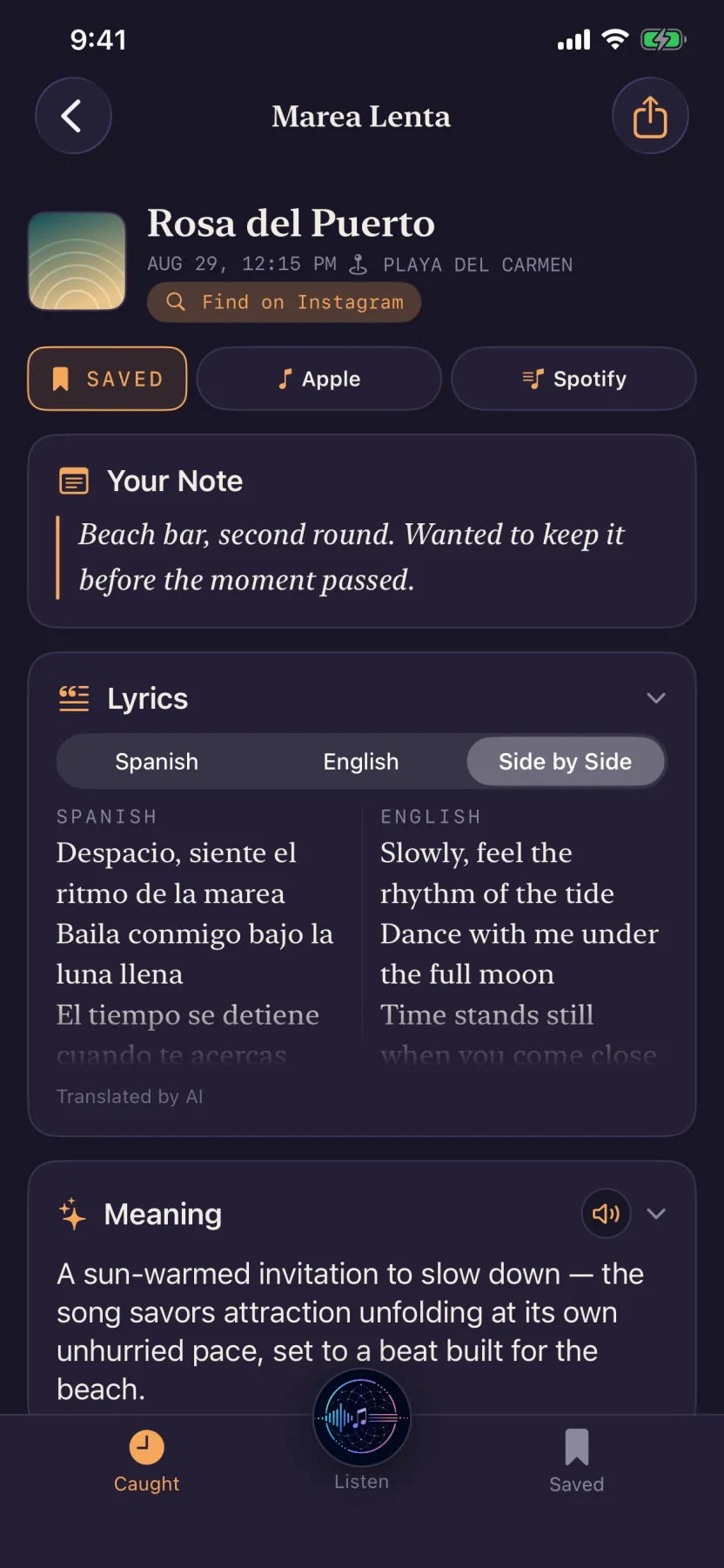
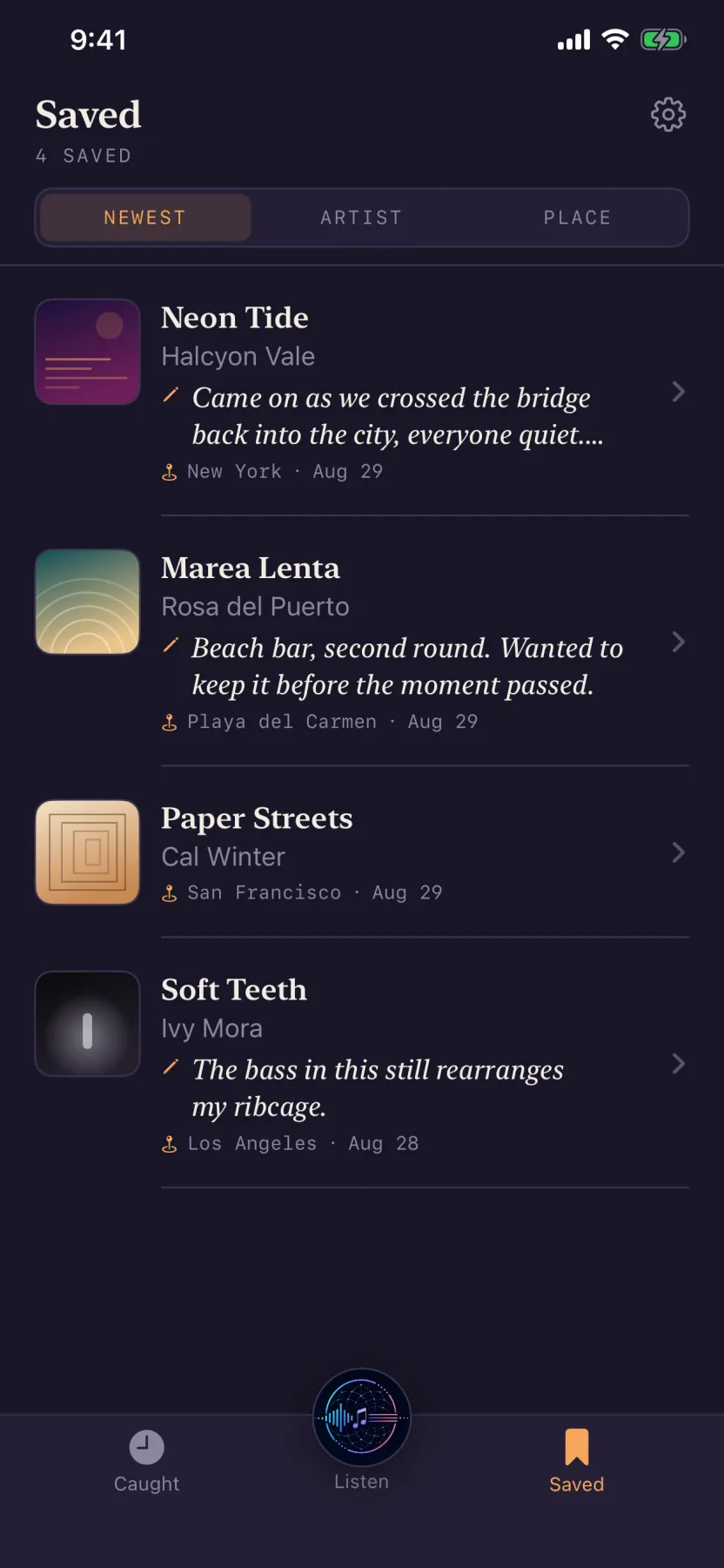
Save the ones worth keeping — one tap on the bookmark — and they open right up: the words, a translation line for line, what the song is actually about, and a link straight into the track.
Free · iPhone · no account, no ads, no tracking
The problem
You only ever Shazam the songs you remember to Shazam.
The rest get away. The one that came on while you were ordering. The one three tracks into a set you were too busy to interrupt. The one in the taxi that ended before you'd found your phone. You get home with a fragment of a chorus and no way back to it.
SongCatcher doesn't need you to be quick. You start it once and it keeps listening — through a set, through dinner, through a four-hour drive — catching each song as it comes and stacking them under the night they happened in. In the morning there's a list.
- Runs for
- Hours, not seconds. One tap at the start of the evening and nothing else asked of you.
- Catches
- Every song that plays while it's on — each one timestamped and filed under the night.
- Keeps
- Every song named and timestamped, filed under the night it happened in, with the neighbourhood you were in.
- Opens
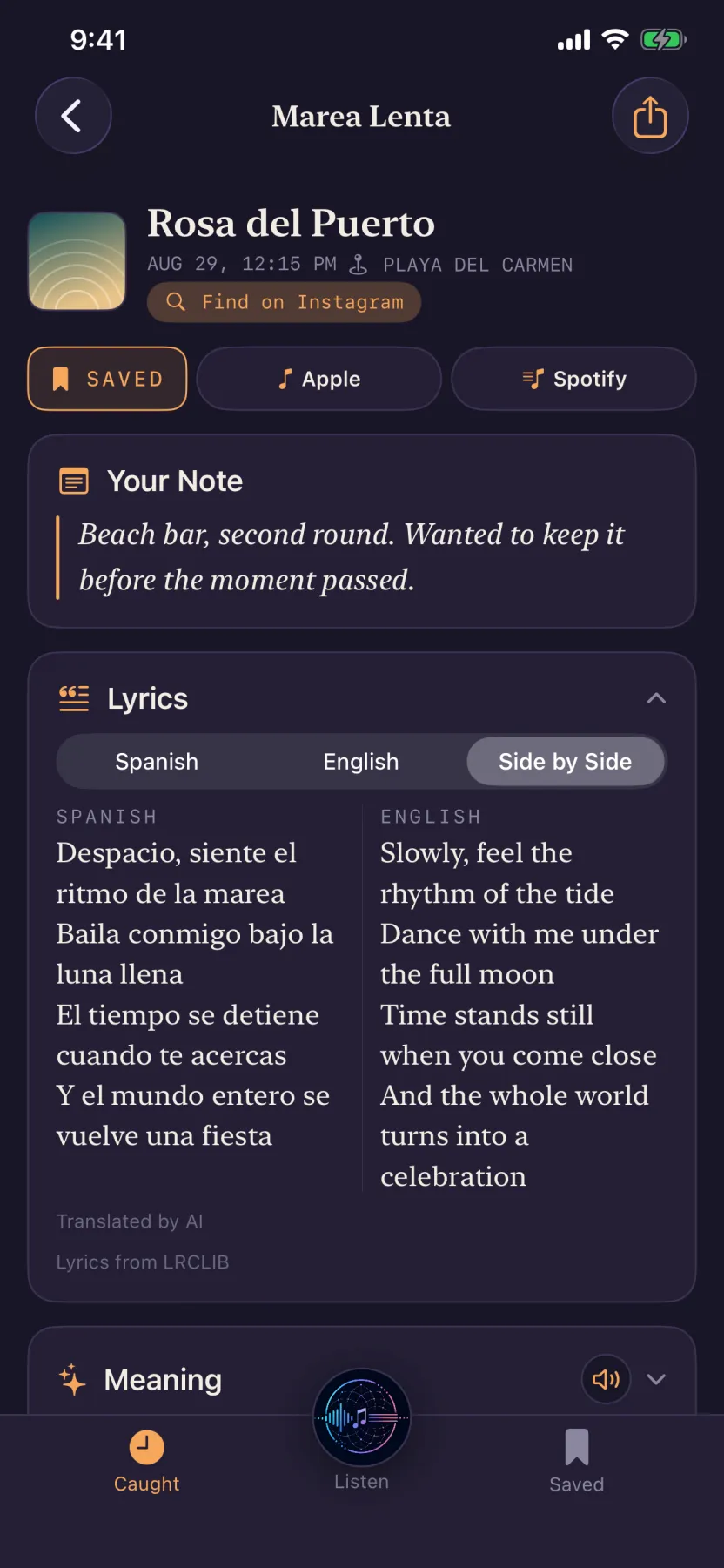
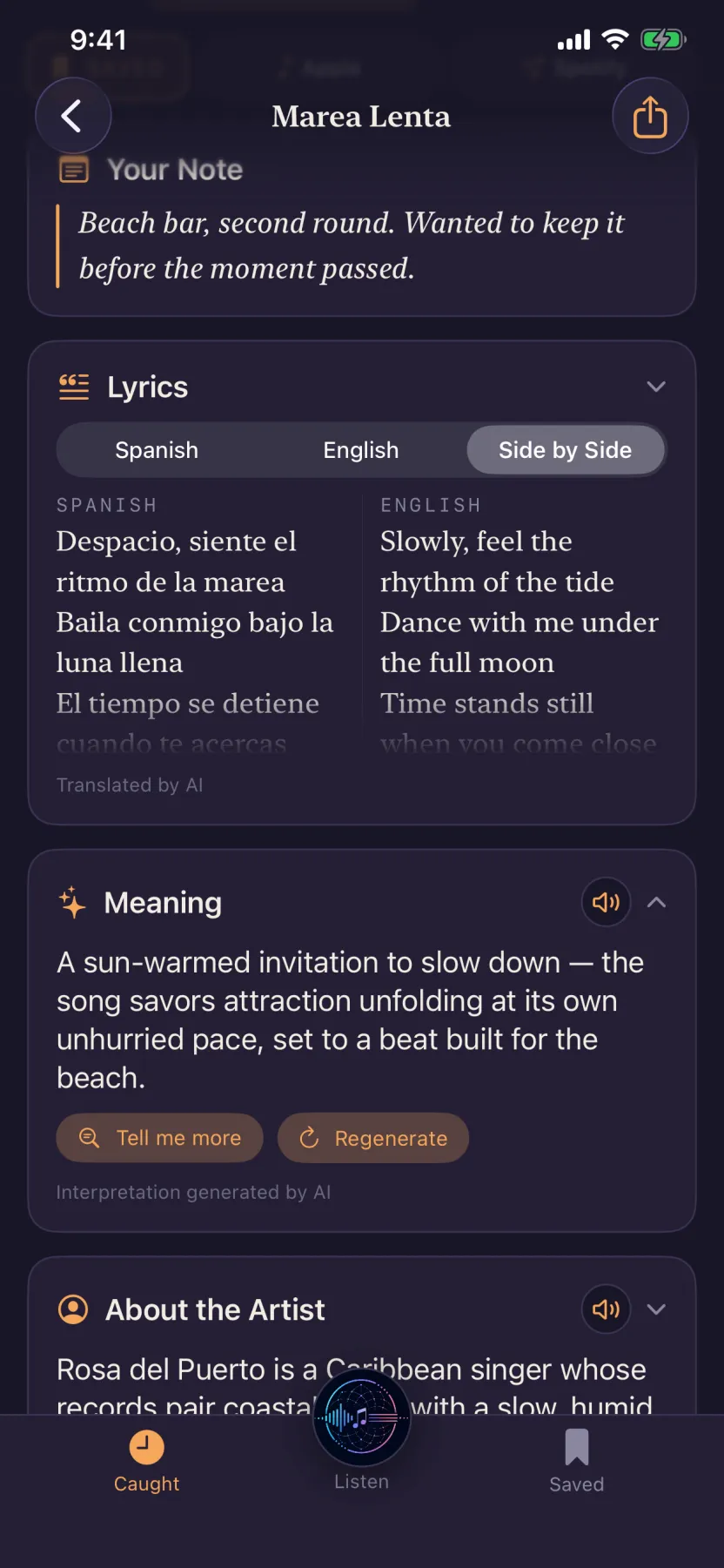
- Save one — a tap on the bookmark — and it fills in: the words, a translation set against the original line for line, a short reading of what they mean, who the artist is, and a link straight into the track.
- Costs
- Nothing to download it, and nothing to use it today. No account, no ads, no trackers, and nothing collected that could be sold.
One evening in Lisbon
You never asked what it was. It was already saved.
Most recognition apps answer one question and stop. This one stays on. Every song below was caught while nobody was looking at a phone.
Example data. The app is new and I'm not going to invent someone's evening.
The obvious question
Yes, it's your microphone, all evening.
Here is exactly what that does and doesn't cost you, before you decide whether to leave it on.
What the mic hears is held in memory a few seconds, long enough to identify a song, then overwritten. It is never written to disk — not on the phone, not anywhere. There is no recording of your evening to find, delete, or leak.
Most songs are named on the device and nothing goes anywhere at all. When the on-device matcher can't place one, a few seconds of audio go out to be matched — no account, no name, nothing tying it to you. That is the only thing that ever leaves.
No analytics, no advertising, no third-party SDKs of any kind. The App Store privacy label reads “Data Not Collected” — that's Apple's checking, not my word for it. Uninstall and every catch goes with it, because there's no server copy to survive it.
It's a low-power listen rather than a recording — nothing is written, streamed or uploaded while it waits for something to identify. A dinner won't dent it. For a full night out, plug in the way you would anyway.
Where it opens
Open it in the app you actually listen in.
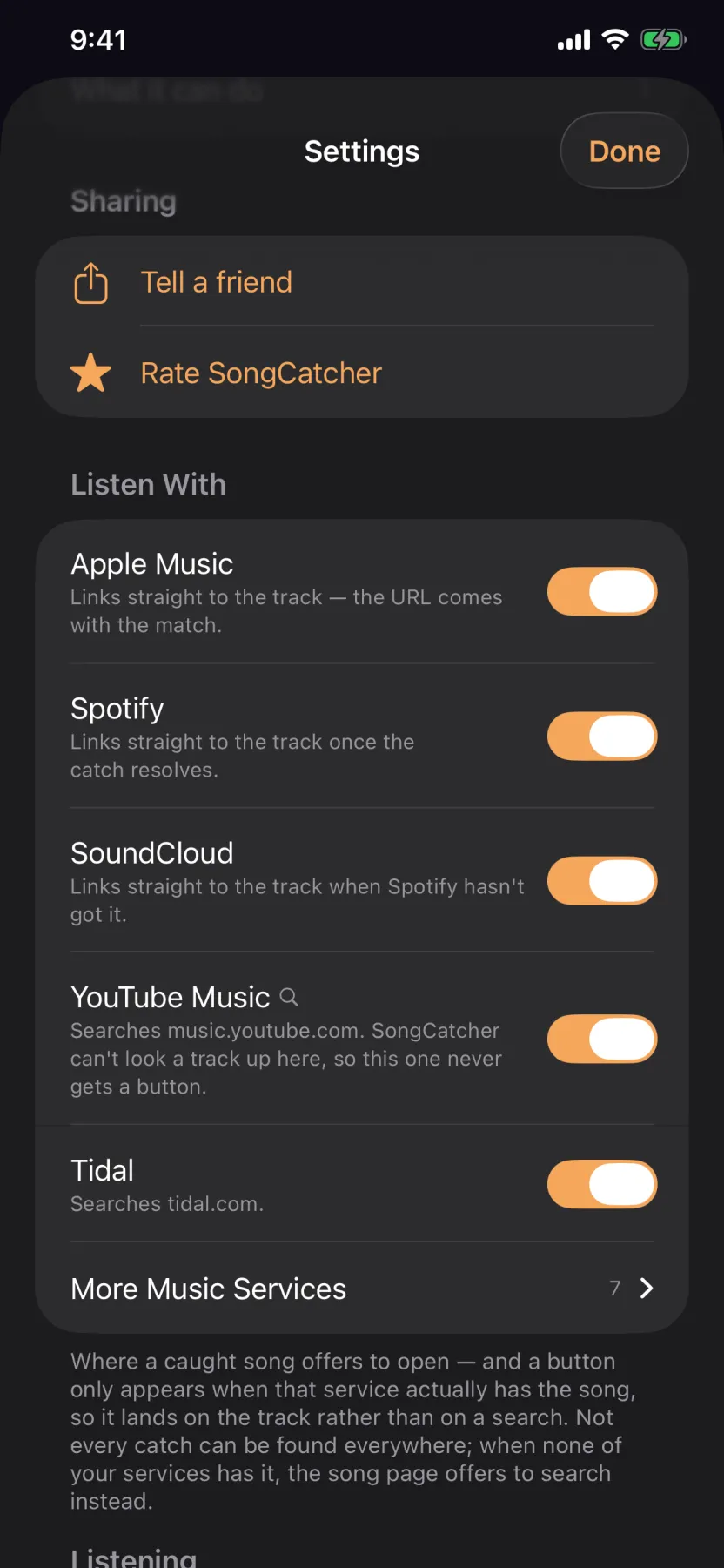
A caught song isn't much use if the only way out of it is a service you don't have. Apple Music and Spotify are on from the start, and nine more are one switch away — YouTube Music, Tidal, Deezer, Amazon Music, Bandcamp, SoundCloud, Qobuz, Pandora and YouTube.
A button only shows up when that service actually has the song. No searches dressed up as listening — if the track can't be found on Tidal, there is no Tidal button, and the ones you do see land on the song itself. When nothing carries it, the page offers a single honest search instead.
The buttons appear on any catch; on one you haven't saved they're there but locked, and tapping a lock saves the song and opens it. Switch off the ones you don't use and they stop appearing at all.
When the easy match fails
Three goes at naming a song, before it admits defeat.
A small label. A regional pressing. A live version that sounds nothing like the record. A cover band. Someone humming. SongCatcher tries three different ways to place a song, in order, without ever asking you which — you just see the answer.
Apple's own matcher
The recognition engine Apple ships, running on the device itself. Most songs are named in a couple of seconds, and no audio leaves your phone to do it.
A different catalogue
When the first draws a blank, a few seconds of audio go to a second service with an entirely different library. Different catalogue, different blind spots.
The melody
No recording to match against, so it matches the shape of the tune instead. That's what places a live take, a cover, or a busker — and what places the one that got away when you hum it in the next morning.
Lyrics · translation · meaning
The little card on the wall, for songs.
In a gallery you look at the painting, and then you read the small printed card beside it — who made it, when, and a few sentences on what you're actually looking at. You come away having seen more than you would have alone.
That card is missing from music. You hear something extraordinary in a bar in a language you don't speak, and the most you get is a title. SongCatcher writes the card for any song you save.
A confession dressed as a complaint — the singer scolds her own heart for beating on its own terms, and the scolding is how she admits she would not have it any other way.
And the words, in both languages at once
When a song isn't in English, the translation sits against the original line for line — so you can find the exact line that got you, not the general gist of the song.
Straight answers
The questions you're already asking.
- Isn't this just Shazam?
- Shazam names the song you got your phone out for. This runs for hours and names everything that plays, including the ones you'd have missed — and the ones you save keep the words, the translation and what the song means alongside them. Apple's matcher is in fact the first thing it tries. It just doesn't stop there.
- Is it really free? What's the catch?
- No account, no ads, no data sold — there's nothing collected that could be sold. It's free today, and everything described on this page is what you get. Some of it costs me real money to run, so I won't promise the pricing can never change; what I will promise is that if it does, it'll be said plainly here rather than discovered in an update.
- Why does the meaning only appear on songs I save?
- Catching a song, naming it and placing it costs nothing per song. The translation, the reading and the artist write-up are written fresh for each one and cost real money, so they're written for the songs you've said are worth it — a tap on the bookmark. Your first few songs come fully unlocked, so you can see what you'd be saving for.
- Does it work in a loud bar?
- That's what it's for. Between three matching methods it places most of what plays through conversation and crowd noise. Nothing places everything, and when it can't, it says so rather than guessing.
- What if it can't name a song?
- Hum it into the app afterwards. Melody matching doesn't need the recording, just the shape of the tune.
- Where do the lyrics come from?
- Open community lyrics databases. Coverage is very good for anything widely released, thinner for obscure and very new tracks.
- I don't use Spotify or Apple Music.
- Settings → Listen With. Add Tidal, Deezer, Amazon Music, SoundCloud, Pandora, YouTube Music, YouTube, Bandcamp or Qobuz, and switch off whatever you don't use. A button appears only when that service really has the song, so it opens the track and not a search — which also means a few of them, Bandcamp and Qobuz among them, can't be reached at all and say so in the list.
- Android?
- Not yet. iPhone only, iOS 17 and later.
Sharing
Send someone the song, not a screenshot of it.
Any catch — or a whole evening of them — becomes a web page you can text to whoever was there with you. You choose what goes on it before it exists: the place, the date, the written meaning, your note. Your note is off unless you switch it on.
Lyrics and your exact location never go on the page at all, and links expire.
The next good song you hear, you'll actually get to keep.
One tap before the first drink. Read the list in the morning.
No account. No ads. Nothing to sign up for.